
Your finances in your pocket, synced with the web
Log expenses instantly, see balance and goals on the home screen — same account, same numbers on iOS and Android.
Desktop-only control doesn't become a habit
If logging a purchase means opening a laptop, small expenses disappear — and the month ends in the red unnoticed.
Log on mobile, see everything updated
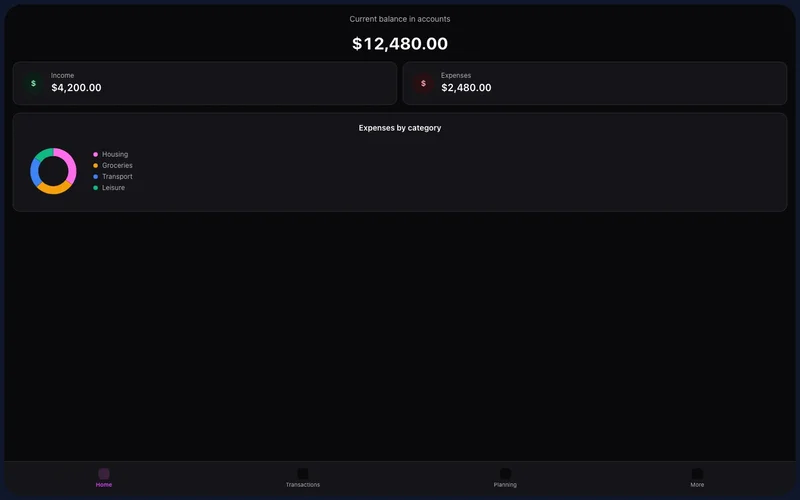
The Kiskadees app brings dashboard, transactions, and planning to your pocket — auto-sync through your account.
Install from the App Store or Google Play and sign in with your Kiskadees email. Language and currency follow your profile.
Use Home, Transactions, and Planning daily. In More: accounts, cards, goals, and settings.
Open banking connections, bulk import, and some advanced settings remain web-first — we tell you in-app when something isn't on mobile yet.
What you get on mobile
- Dashboard with monthly KPIs
- Transaction list and quick add
- Planning tab for budgets
- Accounts, cards, and goals in More
Get started
- 1
Install the app
Download from the App Store or Google Play.
- 2
Sign in
Use the same email and password as the web.
- 3
Build the habit
Log transactions on the spot for accurate balances.
Mobile app FAQ
Is the app free?
Does it sync with the web?
What's not on mobile yet?
iOS and Android?
Explore on web too
Ready for financial clarity?
Create your account in under a minute. Free forever — Premium only if you want it.
Start for free