
Control spending BEFORE you blow the budget
Set category limits and watch live progress bars — adjust mid-month instead of discovering overspend on the statement.
Limit alerts
Get warned before a category goes over budget.
Month-over-month
Spot patterns and adjust targets with context.
Safe to Spend
See how much you can still spend this period.
Static budgets break by week two
You only notice you overspent when the card bill arrives or the balance hits zero.
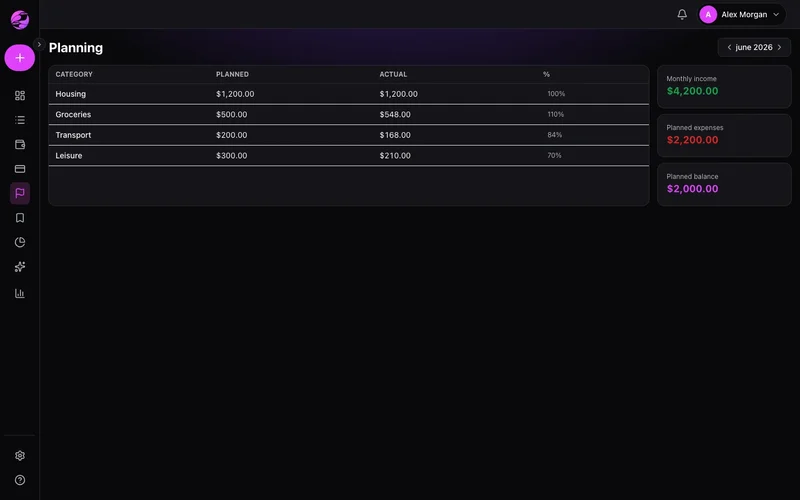
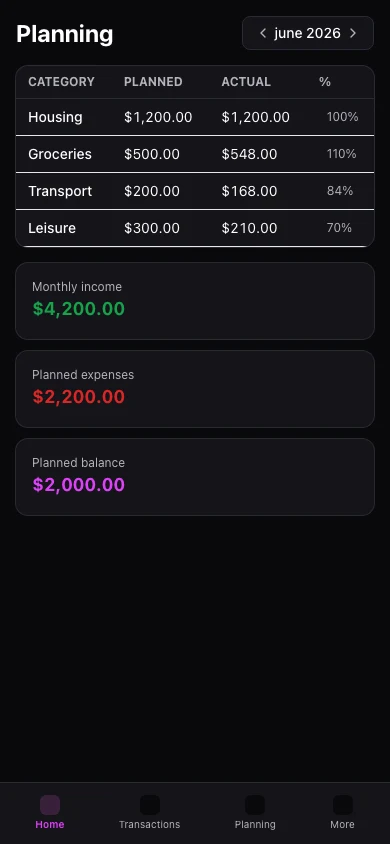
Planned vs actual, always current
Set limits per category and follow progress in real time as transactions land.
The result
Spend on what matters with confidence that essentials are covered.
Build a monthly budget with income and expense categories. Adjust as the month evolves.
Progress bars show spent, remaining, and percent used per category.
Mobile includes a Planning tab. History beyond Free limits requires Premium.
Real example
Restaurants hit 85% of budget on the 20th — you cook at home the rest of the month and stay on track.
What you can do
- Proximity alerts before you hit a limit
- Smart comparison with previous months
- Tied to Safe to Spend on the dashboard
- Free: current month · Premium: unlimited history
How it works
- 1
Pick the month
Start with the current month or unlock history on Premium.
- 2
Set category targets
Allocate based on income and priorities.
- 3
Track as you spend
Watch bars move as entries post through the month.
Budget history on Premium
Free: one active month. Premium: unlimited months and history.
View plansFrequently asked questions
How many budget months on Free?
Do card purchases count?
Budget on mobile?
What if I overspend a category?
Related features
Ready for financial clarity?
Create your account in under a minute. Free forever — Premium only if you want it.
Start for free