
Ask your finances anything
Explore spending patterns, understand categories, and get plain-language answers from your data.
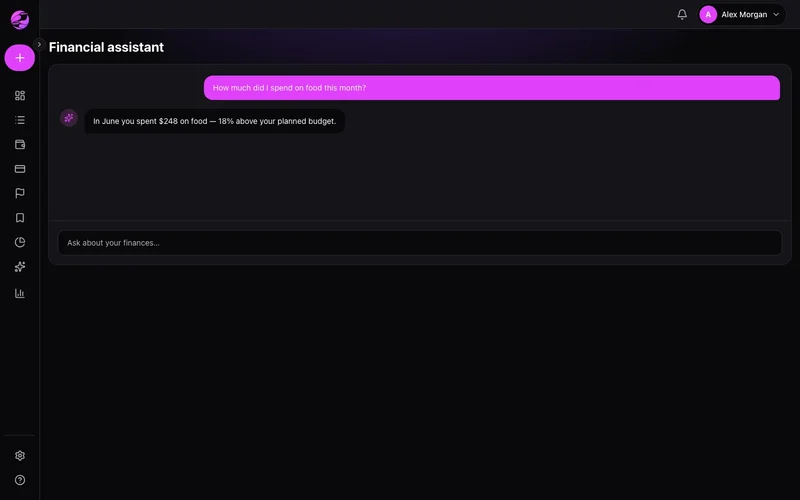
Numbers without a story
Charts show what happened, not what it means or what to try next.
Conversational insights on demand
Chat with the assistant to summarize periods, compare categories, and spot anomalies faster.
The result
Instant clarity on spending patterns you'd never spot manually.
Open the assistant in the web sidebar or under More on mobile. Ask in natural language.
Practical answers — trends, suggestions, and respect for your permissions.
AI features evolve quickly. Availability may vary by plan — see in-app notices.
Real example
Ask: 'How much did I spend on delivery in the last quarter?' — get the total and top merchants in seconds.
Qué puedes hacer
- Natural language questions
- Summaries by period or category
- Contextual follow-up questions
- Available on web and mobile
Cómo funciona
- 1
Open the assistant
Web sidebar or More on mobile.
- 2
Ask something specific
Try: How much did I spend on food this month?
- 3
Go deeper
Follow up or jump to reports for detail.
Preguntas frecuentes
Does the assistant move money?
Is AI on Free?
Is data sent to third parties?
Multilingual support?
Funciones relacionadas
¿Listo para claridad financiera?
Crea tu cuenta en menos de un minuto. Gratis para siempre — Premium solo si lo quieres.
Empezar gratis