
Presupuesto mensual que sigue la vida real
Set category limits and see what's left as transactions arrive — no manual spreadsheet tabs.
Limit alerts
Get warned before a category goes over budget.
Month-over-month
Spot patterns and adjust targets with context.
Safe to Spend
See how much you can still spend this period.
Static budgets break by week two
Spreadsheets don't show live progress. You only notice overspending when it's too late.
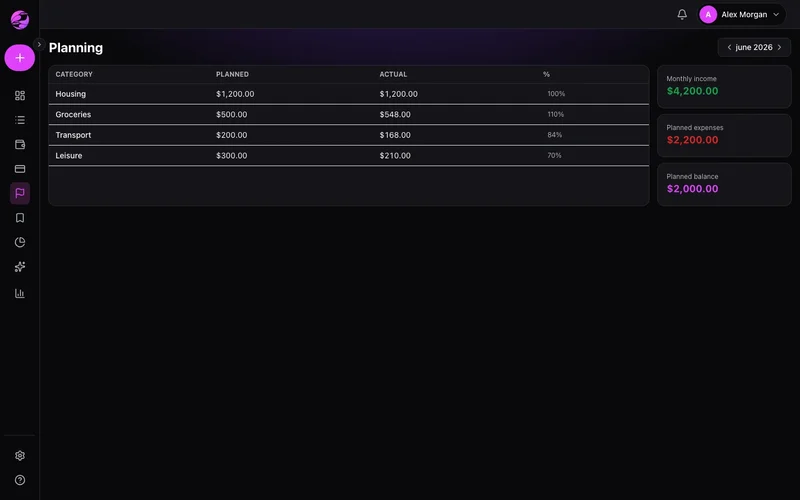
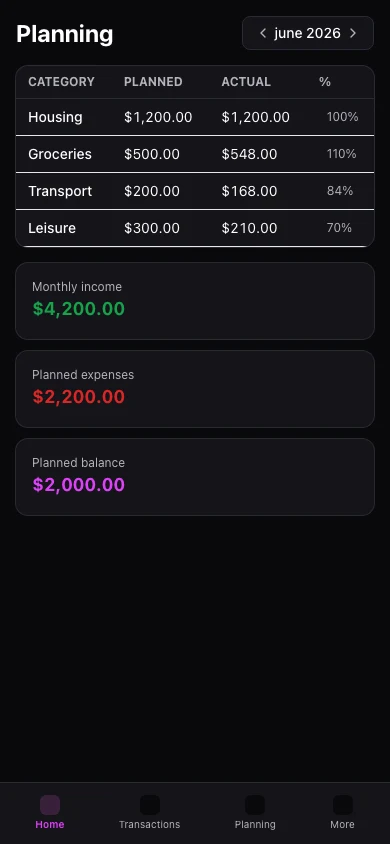
Planned vs actual, always current
Kiskadees compares budget to real transactions and highlights categories needing attention.
The result
Spend on what matters with confidence that essentials are covered.
Build a monthly budget with income and expense categories. Adjust as the month evolves.
Progress bars show spent, remaining, and percent used per category.
Mobile includes a Planning tab. History beyond Free limits requires Premium.
Real example
Restaurants hit 85% of budget on the 20th — you cook at home the rest of the month and stay on track.
Qué puedes hacer
- Category budgets
- Live planned vs actual
- Visual progress per category
- Linked to dashboard safe-to-spend
Cómo funciona
- 1
Pick the month
Start with the current month or unlock history on Premium.
- 2
Set category targets
Allocate based on income and priorities.
- 3
Track as you spend
Watch bars move as entries post through the month.
Budget history on Premium
Free: one active month. Premium: unlimited months and history.
Ver planesPreguntas frecuentes
How many budget months on Free?
Do card purchases count?
Budget on mobile?
What if I overspend a category?
Funciones relacionadas
¿Listo para claridad financiera?
Creá tu cuenta en menos de un minuto. Gratis para siempre — Premium solo si lo querés.
Empezar gratis